
Google does not set a fixed meta description character limit. A description can be longer than the text that appears in a search result. Google may shorten the displayed snippet to fit the device, or choose different text from the page for a particular search.
For drafting, a practical starting point is about 140 to 160 characters, with the main benefit clear in the opening sentence. Treat that as an editing guide, not a Google rule. A useful description that is slightly shorter or longer is better than one padded or cut just to satisfy a counter.
Meta description length is not the same as snippet length
A meta description is a summary stored in a page’s HTML. A search snippet is the descriptive text a search engine actually displays beneath a result.
Those texts can be the same, but they do not have to be. Google’s snippet documentation says snippets are primarily created from page content, sometimes use the meta description, and can differ for different queries. It also says descriptions have no fixed length limit, while snippets are truncated as needed, typically to fit the device width.
This distinction explains why changing a description to exactly 155 characters does not guarantee that all 155 characters will appear.
| What you control | What you cannot guarantee |
| The summary you write | That Google will display it verbatim |
| The order of information | The number of visible lines |
| Whether it matches the page | The same snippet for every query |
| Clear wording and useful details | Identical display on desktop and mobile |
Your goal is to write a strong summary that remains useful when only part of it is visible.
Why characters alone cannot predict the display
Characters do not all have the same visual width. A line containing several wide letters can use more space than a line containing the same number of narrow letters. Font, screen width, line wrapping, and other search-result elements also affect the available space.
For that reason, avoid treating a desktop character limit or a mobile character limit as a permanent specification. A mobile example with fewer visible words demonstrates a possible layout, not a universal cutoff.
A character counter still helps. It makes editing consistent and reveals when a draft is unusually long. It simply cannot reproduce every search result.
A desktop and mobile example using the same description
Imagine a page teaching readers how to remove duplicates in Excel without losing important data. Here is an example meta description:
“Learn how to remove duplicates in Excel, choose which rows to keep, and check your results with clear examples and a simple backup checklist.”
This description contains 140 characters, including spaces and punctuation. The examples below show how the same description could look on desktop and mobile screens. These are simplified illustrations, not actual Google search results.
Desktop Preview
Remove Duplicates in Excel Without Losing Data
Learn how to remove duplicates in Excel, choose which
rows to keep, and check your results with clear examples
and a simple backup checklist.
Mobile Preview
Remove Duplicates in Excel
Without Losing Data
Learn how to remove duplicates
in Excel, choose which rows to
keep, and check your results…
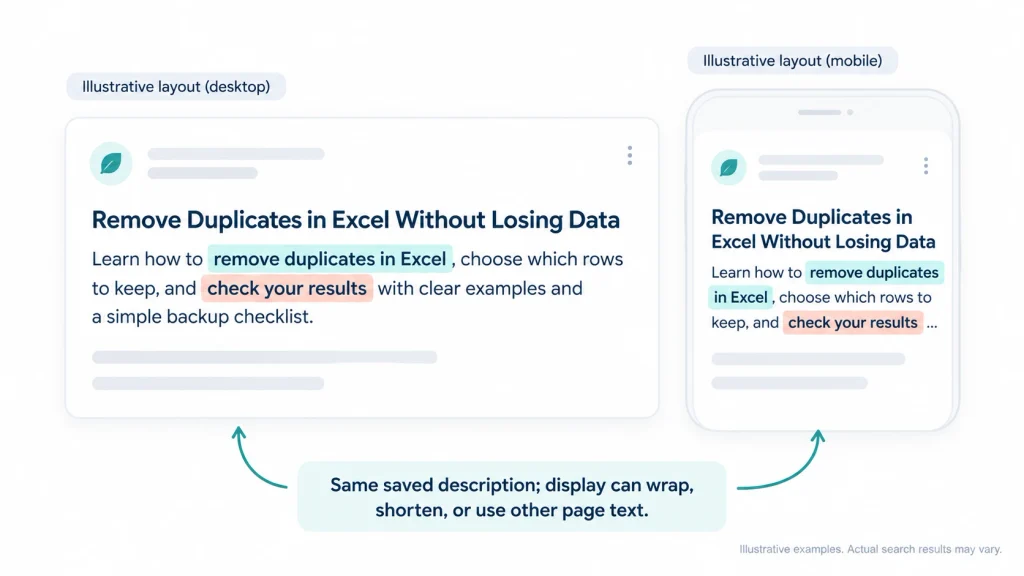
Both examples communicate the page’s purpose immediately. Even when the description is shortened, readers can still understand what the article covers. The less important detail about the backup checklist appears later.
Now consider a weaker opening:
“Welcome to our latest detailed guide, where we explore everything you need to know.”
This sentence uses valuable space without explaining what readers will learn. If the snippet is shortened, users may never see the information they actually need.
The key takeaway is to put the most useful information first. Explain what the page covers and why it matters before adding supporting details.
Remember that Google does not always display your written meta description. It may generate a different snippet from the page’s content based on the search query. The amount of text displayed can also vary depending on screen width, device, and search result layout. That is why clarity matters more than reaching an exact character count.
Compare short, useful, and overlong descriptions
Here are three ways to describe the same Excel article. The counts include spaces and punctuation, but not surrounding quotation marks.
Too vague to help the reader
Read our helpful guide to Excel.
32 characters. This is brief, but it does not explain which Excel task the page solves. Making a description short is not the same as making it useful.
Specific and focused
Learn how to remove duplicates in Excel, choose which rows to keep, and check your results with clear examples and a simple backup checklist.
141 characters. The topic, the record-selection problem, and the practical format are clear.
More detail than the snippet may need
Learn how to remove duplicates in Excel with a detailed explanation of matching columns, keeping the newest record, checking hidden spaces, using formulas, making backups, and reviewing your final dataset before sharing it with colleagues.
239 characters. This may be a reasonable description of the article, but the list of details competes for attention. It also puts useful information later in the text. The issue is not that a longer description automatically causes a penalty. The issue is whether the reader can quickly understand the page’s value.
An effective edit does not blindly delete the last sentence. It decides which detail helps someone choose this page and moves that detail toward the beginning.
A simple way to write a better description
Start with the reader’s task. Then add one concrete benefit or distinguishing feature that the page actually delivers.
A useful pattern is:
Main task + important benefit + one supporting detail
For a conversion guide, that could mean the conversion direction, a promise to explain the formula, and a worked example. For a typing resource, it could mean practice paragraphs, the skills covered, and a clear progression from easy to harder exercises.
Draft the sentence naturally before counting it. Then remove phrases that do not help the reader choose. “In this comprehensive article” usually uses space that could describe something concrete.
Use the main keyword when it fits the sentence. Do not repeat variants such as “meta description length, meta description max length, meta description character count” as a list. A description is a preview for a person, not a place to unload the keyword sheet.
How much information should come first?
As an editorial exercise, check whether the first 100 to 120 characters communicate a complete useful idea. This is not a guaranteed mobile display allowance. It is a way to test whether the beginning stands on its own.
Try reading only the opening sentence. Can you identify the task, audience, or benefit? If not, move the important point forward.
For our Excel example, “Learn how to remove duplicates in Excel” identifies the task. “Choose which rows to keep” adds the main reason to prefer this particular guide. Everything after that can support the promise without being necessary to understand it.
This approach also discourages vague brand introductions. Readers searching for a solution usually need to know what the page will help them do before they need a slogan.
Check the preview, then check the page
A meta Preview tool can help you inspect a draft’s presentation. Use the preview to judge clarity and balance, not as a promise of the exact Google result.
Before publishing, check three things together: the title, the description, and the first section of the article. They should describe the same page. A description that promises a downloadable template is misleading when the article only contains a paragraph about templates.
Also confirm that the correct description is saved for the correct URL. When multiple pages have nearly identical summaries, readers get less help distinguishing them. The best fix is often to describe each page’s specific purpose, not simply to change a few words.
Why Google may show different text
A different snippet does not automatically mean your description is too long. The search query may be better answered by a specific passage in the article. The text Google has processed may also differ from your latest edit.
Use this troubleshooting order: confirm the saved page description, check that it matches the visible content, compare the query with the page’s main purpose, and only then decide whether the wording needs to change. Repeatedly shortening a good summary may not solve a query-relevance problem.
Does the exact length improve rankings?
Do not treat a 155-character description as a ranking technique. Google has stated that the description meta tag is not used as a ranking signal. Its useful role is to describe the page and help a searcher decide whether to visit.
That also means there is no reason to add filler just to reach a supposed minimum or to promise that shortening a description will increase rankings.
How to judge whether an edit helped
Keep a record of the old description, new description, page URL, and change date. In the Search Console Performance report, review clicks, impressions, click-through rate, and average position for the page. Compare similar queries and device types where possible.
CTR is clicks divided by impressions. For example, 40 clicks from 2,000 impressions is 2%. A later result of 60 clicks from 2,000 impressions is 3%, but that change alone does not prove the description caused it. Rankings, query mix, seasonality, and the snippet actually displayed may also have changed.
For a low-traffic page, avoid drawing conclusions from a handful of impressions. Concentrate first on whether the description is accurate, specific, and easy to understand.
The takeaway: write a clear summary, put the main value first, and use length as a drafting aid. Desktop and mobile previews help you edit, but neither a character count nor a preview tool can guarantee Google’s final snippet.