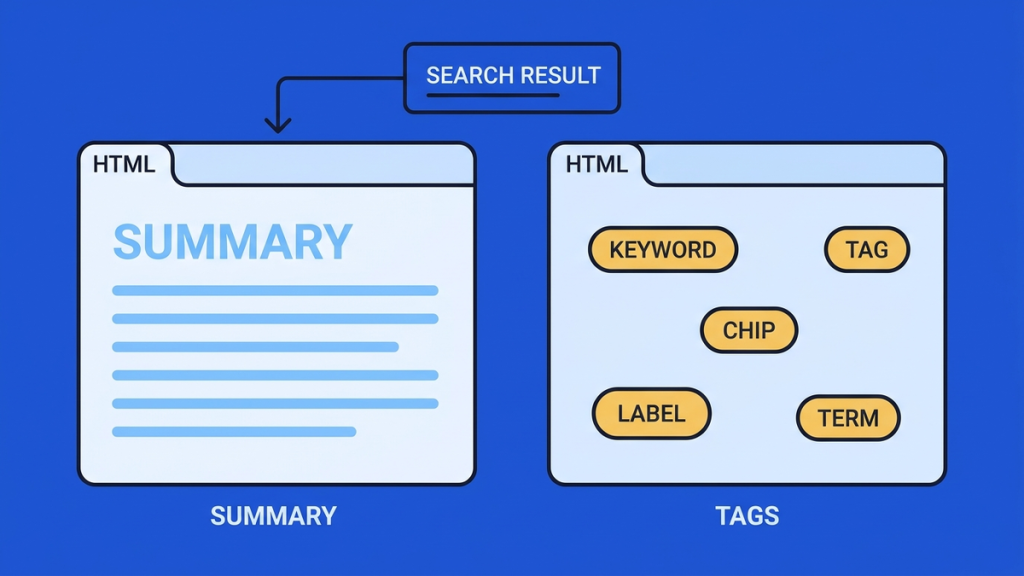
A meta description is a short page summary that Google may use in a search-result snippet. A meta keywords tag is an HTML list of keywords that Google does not use for indexing or ranking.
They are different fields with different purposes. Writing a useful description can help explain your page to a searcher. Filling a meta keywords tag is not a shortcut to Google rankings.
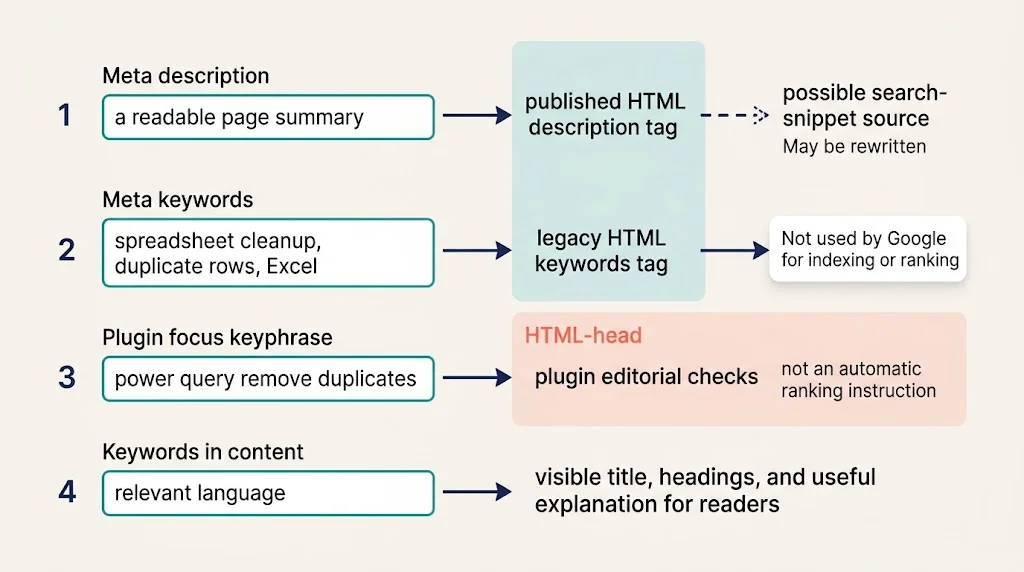
There is another common source of confusion: the focus keyword you enter in an SEO plugin is not automatically an HTML meta keywords tag. Nor is either field a replacement for useful content on the page.
Meta description and meta keywords at a glance
|
Item |
What it contains |
Practical use |
|---|---|---|
|
Meta description |
A readable summary of one page |
Suggests text that may appear in a search snippet |
|
Meta keywords tag |
A list of keyword phrases |
Not used by Google for indexing or ranking |
|
Plugin focus keyphrase |
A phrase used by the plugin’s analysis tools |
Helps guide that plugin’s checks |
|
Keywords in your content |
Relevant language in the title, headings, and body |
Helps explain the page’s actual subject to readers |
The last two rows are not alternative names for meta keywords. Keeping them separate makes it much easier to decide what needs editing.
What is a meta description?
A meta description sits in the HTML head of a page. It is not normally shown as a paragraph in the page body.
For a hypothetical guide about cleaning spreadsheet data, the tag might look like this:
<meta name=”description”
content=”Remove duplicate Excel rows safely. Learn how to choose
comparison columns and check which records remain.”>
This is a formatted code example. In an SEO plugin’s description field, enter the description as ordinary text, without the surrounding HTML tag.
The description tells a potential reader what the guide offers. It is more useful than a string such as “Excel duplicates, duplicate Excel, remove duplicates, Excel cleanup” because it describes a specific outcome.
According to Google’s snippet guidance, search snippets are primarily generated from page content. Google sometimes uses the supplied meta description when it considers that description a suitable summary. The displayed text can therefore differ between searches.
You are suggesting a description, not reserving an exact line of text in Google.
What is the meta keywords tag?
A legacy meta keywords tag can look like this:
<meta name=”keywords”
content=”spreadsheet cleanup, duplicate rows, Excel”>
The list describes subjects, but Google’s current documentation on supported meta tags explicitly says the meta keywords tag has no effect on indexing or ranking.
Do not confuse that statement with “keywords do not matter anywhere.” It concerns this particular HTML tag. Readers still need an accurate page title, useful headings, and an explanation that uses the language of their problem.
For example, a page about removing duplicate records should explain what a duplicate is and how to retain the correct record. A hidden keyword list cannot supply that missing explanation.
Do meta descriptions directly improve rankings?
Google’s published explanation of description and keywords tags states that descriptions may be used for snippets but are not used as a ranking signal. That explanation is historical; Google’s current supported-tag documentation continues to confirm that meta keywords are not used.
A description is still worth writing because it can communicate what someone will find after clicking. That is a different claim from promising a ranking increase.
Avoid the following logic: “A better description means more clicks, so it guarantees a higher position.” A change in clicks can have many causes, and the description may not even have been displayed for every search.
Focus keyphrase versus meta keywords
Suppose you enter power query remove duplicates in an SEO plugin’s focus-keyphrase field.
The plugin may use that phrase to assess your draft. Depending on the plugin, it can check whether related wording appears in the title, introduction, or other locations. That is an editing aid within the plugin.
A meta keywords tag is a specific piece of published HTML. To know whether one exists, inspect the page source instead of assuming that every field labeled “keyword” creates the same output.
This distinction also prevents a common mistake: putting several phrases into a focus-keyphrase field and assuming Google now receives a preferred ranking list. The important task is still to produce a page that answers the intended search clearly.
Write a description that matches the page
Start with three questions:
- What specific task does this page help the reader complete?
- What useful example, tool, or explanation will they find?
- Does the page actually deliver everything the description promises?
For a guide about number typing, a weak description is:
“Best typing guide with typing tips and amazing typing information.”
A stronger version is:
“Practice numbers on the top row and numeric keypad with original drills, decimal examples, and a simple accuracy log.”
The second version explains the contents. It does not promise a particular speed improvement or claim to be the best without evidence.
Use the main phrase when it fits naturally. Do not repeat it several times just to satisfy a score.
Do not treat a character target as a Google rule
Google does not prescribe one fixed meta description character limit. Display space can vary, and a snippet may be shortened or replaced.
A concise working draft is easier to edit, but do not remove an essential detail merely to hit an arbitrary count. Put the main value early and remove repetition first.
The NavigationHubs Search Preview can help you review a draft’s presentation. It is an illustration, not a prediction of the exact text or layout Google will display.
Check which tags your page actually publishes
On a desktop browser, open the published page and choose View Page Source. Search for name=”description” and name=”keywords”. Attribute order, spacing, and quote style can differ, so broaden the search when needed.
Check the description’s content against the text you saved. Also look for duplicate description tags. If a theme and a plugin both output metadata, investigate which component should own it rather than adding another tag.
If your site uses a setup that changes metadata after the initial HTML loads, a developer may need to inspect the rendered page too.
Should you delete existing meta keywords?
For Google SEO alone, you do not need to maintain a meta keywords list. Removing it is not, by itself, a ranking strategy either.
Before removing fields across a site, check whether a custom internal system uses that data. An old application might read a field for its own purposes even when Google ignores it.
Most importantly, do not delete every meta tag because one tag is unnecessary. Character encoding, viewport settings, and robots directives have different jobs. Editing the wrong one can change behavior unrelated to keyword targeting.
Frequently asked questions
Can the same keywords appear in my description and article?
Yes, when they naturally describe the content. That is different from filling a description with repeated variations of the same phrase.
Why is Google showing a different description?
The snippet can be selected from the page to suit the search. Also confirm that your saved description appears in the published HTML before diagnosing a search-result difference.
Is a plugin’s green score proof that the metadata is correct?
No. A score can guide an editing check, but it does not prove that the published page has the right tags or that the description accurately represents its content.
Spend your effort on a useful page and a clear, truthful description. Do not let an obsolete meta keywords field distract you from those tasks.