
For a list of strings, numbers, or other hashable values, use list(dict.fromkeys(values)) to remove duplicates while keeping the order of their first appearance:
values = ["blue", "red", "blue", "green", "red"]
unique = list(dict.fromkeys(values))

print(unique)
# ['blue', 'red', 'green']
This creates a new list and leaves values unchanged. Dictionary insertion order is guaranteed in Python 3.7 and later, as described in the official dictionary documentation.
For lists containing other lists or dictionaries, the right method is different. The useful question is not just “How do I remove duplicates?” It is “What makes two items the same, and which one should I keep?”
Choose the Method that Matches Your Data
| Your data or requirement | Suitable approach | Keeps original order? |
| Strings, numbers, hashable tuples | dict.fromkeys | Yes, first occurrences |
| A custom matching rule | A seen set plus an output list | Yes, first matches |
| Small lists of unhashable values | Compare each item with the output list | Yes, first matches |
| Dictionaries identified by one field | Track that field in a seen set | Yes, first matching records |
| Hashable values, keeping last occurrences | Reverse, deduplicate, reverse back | Yes, in last-occurrence order |
| Order does not matter | A set may be enough | No insertion-order guarantee |
The examples below use only Python’s standard library. You do not need to install a package for these tasks.
Why dict.fromkeys Preserves the First Occurrence
dict.fromkeys(values) uses the list items as dictionary keys. Repeated equal keys do not create new entries. Converting the dictionary to a list returns its keys in their insertion order.
In the opening example, the first blue creates a key. The first red creates another. The second blue does not create a new key or move the existing one. green is added next.
This is different from sorting the unique values. The output follows the input’s first appearances, not alphabetical order.
The same approach works for an empty list:
values = []
unique = list(dict.fromkeys(values))

assert unique == []
Why list(set(values)) is not the same solution
A set removes duplicate hashable values, but it does not promise to preserve their input order. A short example may appear to return the desired order by chance. That is not a guarantee you should build into your program.
Use a set when uniqueness is the only requirement. Use an order-preserving method when the sequence represents priorities, a reading list, a workflow, or the order in which records arrived.
Use a Seen Set When You Need More Control
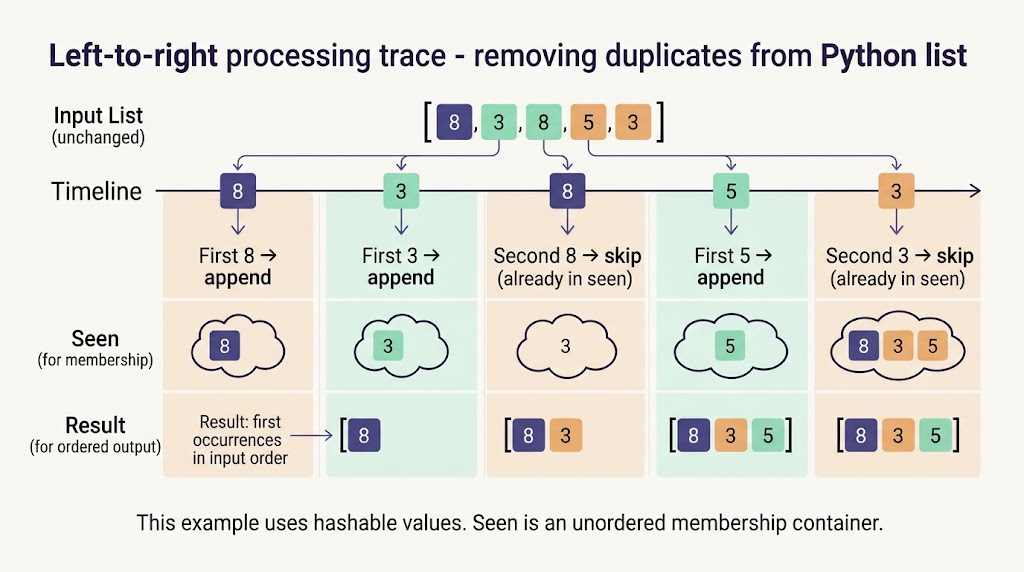
A clear loop lets you separate the check for duplicates from the output you want to keep. This reusable function accepts hashable items and returns their first occurrences:
from typing import Hashable, Iterable, List, TypeVar

T = TypeVar("T", bound=Hashable)


def unique_in_order(items: Iterable[T]) -> List[T]:
    """Return the first occurrence of each hashable item."""
    seen = set()
    result = []

    for item in items:
        if item not in seen:
            seen.add(item)
            result.append(item)

    return result


values = [8, 3, 8, 5, 3]
assert unique_in_order(values) == [8, 3, 5]
assert values == [8, 3, 8, 5, 3]
seen answers whether an item has appeared before. result stores the original items in the order you want. Keeping those jobs separate also makes the next examples easier to adapt.
The type hint describes the intended input. It does not turn an unhashable item into a hashable one or silently fix invalid data.
Ignore Capitalization without Changing the Saved Text
Suppose the list contains “Apple” and “apple”, and your rule says they are the same label. Build a comparison key while preserving the original first item:
labels = [" Apple ", "apple", "BANANA", "Banana", "pear"]
seen = set()
unique = []

for label in labels:
    key = label.strip().casefold()
    if key not in seen:
        seen.add(key)
        unique.append(label)

assert unique == [" Apple ", "BANANA", "pear"]
The comparison ignores surrounding whitespace and letter case. The output does not: it keeps the first original string, including its surrounding spaces.
To save trimmed labels instead, append label.strip(). Make that decision deliberately. Normalizing a display label may be useful; normalizing a case-sensitive identifier may change its meaning.
This example expects strings. It should not silently convert every object to text, because the integer 12 and the string “12” may represent different things in your application.
Remove duplicate lists without a hashing error
Lists and dictionaries are mutable and are not usable as ordinary dictionary keys. Python’s definition of hashable objects explains the requirements and why a tuple is only hashable when its contents are hashable too.
For a small list of lists, compare each item against the result directly:
rows = [[1, 2], [3, 4], [1, 2], [2, 1]]
unique_rows = []

for row in rows:
    if row not in unique_rows:
        unique_rows.append(row)

assert unique_rows == [[1, 2], [3, 4], [2, 1]]
The order inside each inner list matters: [1, 2] and [2, 1] are different lists. This method preserves both when they appear.
The tradeoff is the number of comparisons. Each new item may need to be compared with many retained items. With a large number of distinct entries, that can grow roughly with the square of the input length. For bigger datasets, define a reliable hashable key when your data allows it.
Do not use str(row) as a universal workaround. A text representation is not a general definition of object equality.
Keep one dictionary per ID
Two records can share an ID while containing different names or statuses. Choose whether the ID alone defines the duplicate.
records = [
    {"id": 17, "name": "Mina", "status": "pending"},
    {"id": 22, "name": "Owen", "status": "active"},
    {"id": 17, "name": "Mina", "status": "active"},
]

seen_ids = set()
unique_records = []

for record in records:
    key = record["id"]
    if key not in seen_ids:
        seen_ids.add(key)
        unique_records.append(record)

assert [r["id"] for r in unique_records] == [17, 22]
assert unique_records[0]["status"] == "pending"
The first record for ID 17 survives, including its pending status. This code does not merge records or select the newest status.
A missing id raises KeyError, and an unhashable ID raises TypeError. Those failures make a broken input contract visible. In production, decide whether invalid records should stop processing, be logged, or be sent to a review list. Do not quietly treat every missing ID as the same person.
Also note that the output contains references to the original dictionaries, not deep copies. Editing a retained dictionary can therefore change the corresponding original record.
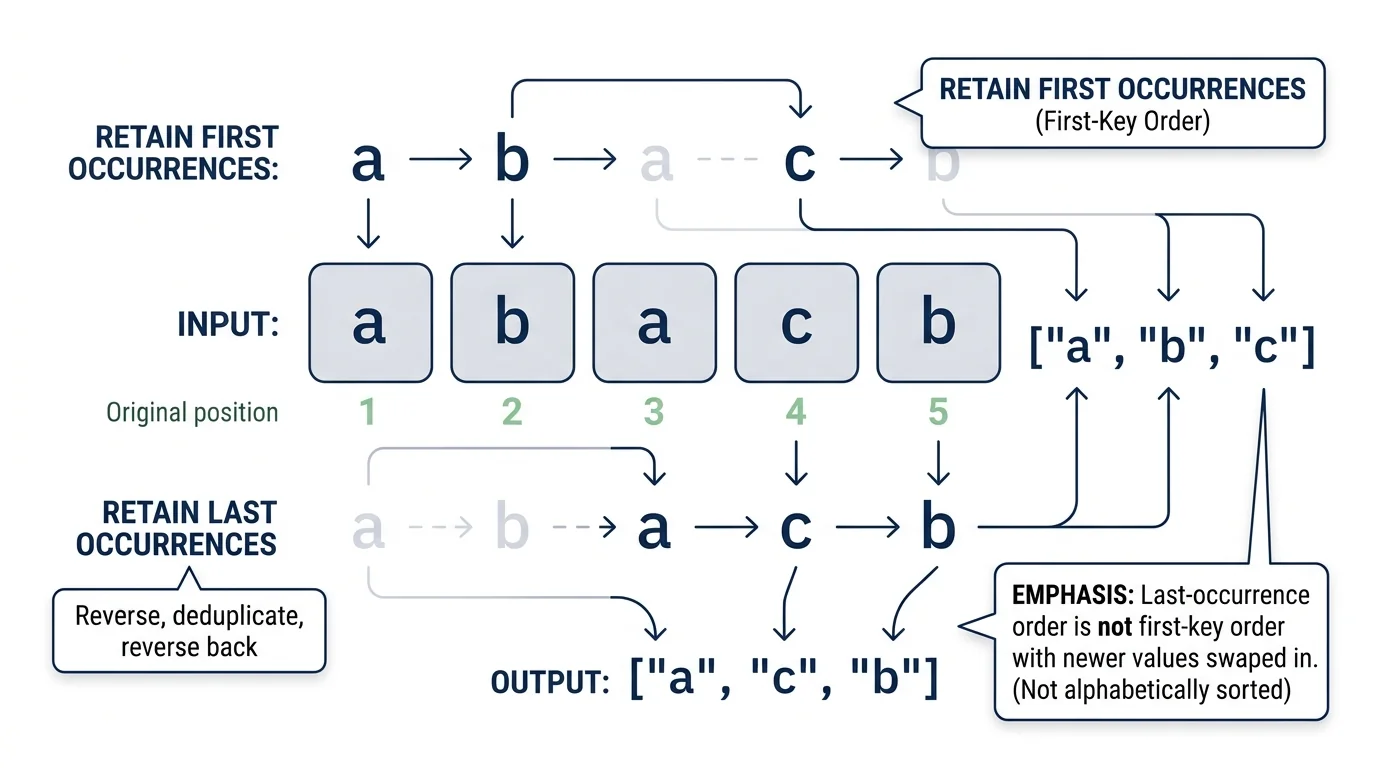
Keep the last occurrence instead
For hashable values, reverse the list, keep the first occurrence in that reversed view, then reverse the result:
values = ["a", "b", "a", "c", "b"]
unique_last = list(dict.fromkeys(reversed(values)))[::-1]

assert unique_last == ["a", "c", "b"]
The retained positions in the original list are the last a, the c, and the last b, in that order. This is last-occurrence order, not the first-occurrence order with newer data swapped in.
That distinction matters when you are choosing between competing definitions of “keep the last record.”
Watch out for values that compare equal
Python equality can group values that look like different types:
values = [1, True, 1.0, "1"]
assert list(dict.fromkeys(values)) == [1, "1"]
Here, 1, True, and 1.0 compare equal, while the string “1” is different. To treat their types as part of the identity, use a key such as (type(item), item) for hashable items.
For custom objects, equality and hashing behavior come from the class. Decide what a duplicate means before selecting a method, especially when working with missing values, custom classes, or mixed data types.
Check the result before replacing the original list
Use a few assertions with known expected results. Test empty input, all-duplicate input, mixed order, and any special matching rules you introduce. Also check that the original list is unchanged when that is a requirement.
Avoid removing items from the same list while looping over it. Building a new result is easier to reason about. If other parts of your program need the existing list object updated, assign the finished result back with values[:] = unique after the loop.
For one-per-line plain text rather than Python objects, the NavigationHubs Duplicate Line Remover offers a non-code option. It does not reproduce Python’s object equality, type handling, or record-selection rules.
The takeaway: start with dict.fromkeys for simple hashable values, use a seen-key loop for custom identity rules, and compare unhashable objects carefully. Preserving order is only half the job; preserving the right meaning is the other half.